As of this Christmas day, this is my assessment of the main technologies & products out there supporting Coded UI Testing. For those who don't know, Coded UI Testing is about programmers writing tests in code that automate functional testing by ways of replaying user actions on an application. Product Comparison:
Category
MS Coded UI Tests
Selenium
Awesomium
PhantomJs
Watir
TestComplete
Unified Functional Testing (UFT)
Cross Browser Support
Not by default.
Requires Selenium
components to be installed.
Yes
Requires
WebDrivers.
No (Uses Chrome core)
No
Yes
Yes
No
Ease of programming
A bit clunky unless additional wrapper library installed:
The order of the category is in decreasing importance. For my use case, cross browser support is the most important because the applications under test are websites requiring to be run on multiple browser types. In the mean time, record and playback is least important as this style of test generation create brittle tests that can be run on a browser not another, and changing the application UI results in broken tests that are hard to maintain.
In short, Selenium is the clear winner if you want the most mature Coded UI testing support, plus it is free. Microsoft's Coded UI test is a runner up for its close integration with Visual Studio. But price is a factor since this feature is only available in the premium or ultimate edition. Watir is third to me as it is somewhat hard to setup on Windows and the documentation is a bit sketchy. But if you are in the Ruby camp, you definitely should give this a try.
I was exploring a bit on logging in Topshelf using Log4Net. It's quite easy to use once I figured out how to pass in the log config file and having the correct content in the config file.
Below is an example showing how to set this up with the bare minimum to get the logging to work.
Topshelf program:
public class Program
    {
        public static void Main(string[] args)
        {

            HostFactory.Run(hostConfigurator =>
                {
                    hostConfigurator.UseLog4Net("..\\..\\App.config");

                    hostConfigurator.Service<bird>(serviceConfigurator =>
                        {
                            serviceConfigurator.ConstructUsing(name => new Bird());
                            serviceConfigurator.WhenStarted(nm => nm.Start());
                        });
                });
        }
    }

    public class Bird
    {
        public void Start()
        {
            HostLogger.Get<bird>().Info("Chirp, chirp!");
        }
    }
If you're using C# at work and are a little serious about unit testing, then the Moq framework can be your friend. It's simple to use and will do the job for both classical TDDer or a mockist TDDer.
Referencing from the original blog, the following code completes the example so the mockist part is more correct and aligned with the real-world situation.
using System;
using System.Collections.Generic;
using System.Web;
using EasyAssertions;
using Moq;

namespace MoqTest
{
    class MoqTesting
    {
        static void Main()
        {
            Run();
        }

        private static void Run()
        {
            ClassicalTdd();
            MockistTdd();
        }

        private static void ClassicalTdd()
        {
            var newProduct = new Mock<IProduct>();
            newProduct.SetupGet(p => p.Id).Returns(1);
            newProduct.SetupGet(p => p.Name).Returns("Bushmills");

            newProduct.Object.Name.ShouldBe("Bushmills");

            var productRepository = new Mock<IProductRepository>();
            productRepository
                .Setup(p => p.Get(It.Is<int>(id => id > 0 && id < 6)))
                .Returns(newProduct.Object);

            var productReturned = productRepository.Object.Get(1);
            productReturned.Name.ShouldBe("Bushmills");
        }

        private static void MockistTdd()
        {
            var mockCache = new Mock<ProductCache>();
            var mockDatabase = new Mock<Database>();
            var mockProduct = new Mock<IProduct>();

            mockCache
                .Setup(c => c.Get(1))
                .Returns<IProduct>(null)
                .Verifiable();

            mockDatabase
                .Setup(d => d.Fetch(1))
                .Returns(mockProduct.Object)
                .Verifiable();

            mockCache
                .Setup(c => c.Set(1, mockProduct.Object))
                .Verifiable();

            ProductRepository sut = new ProductRepository(mockCache.Object, mockDatabase.Object);
            sut.GetProduct(1);

            mockCache.Verify();
        }
    }

    public interface IProductRepository
    {
        List<IProductRepository> Select();
        IProduct Get(int id);
    }

    public class ProductRepository : IProductRepository
    {
        private readonly ProductCache _cache;
        private readonly Database _db;

        public ProductRepository(ProductCache cache, Database db)
        {
            _cache = cache;
            _db = db;
        }

        public IProduct GetProduct(int id)
        {
            var product = _cache.Get(id);
            if (product == null)
            {
                product = Get(id);
                _cache.Set(id, product);
            }
            return product;
        }

        public List<IProductRepository> Select()
        {
            throw new NotImplementedException();
        }

        public IProduct Get(int id)
        {
            return _db.Fetch(id);
        }
    }

    public class ProductCache
    {
        public virtual IProduct Get(int id)
        {
            return (IProduct)HttpContext.Current.Cache["product_" + id];
        }

        public virtual void Set(int id, IProduct product)
        {
            HttpContext.Current.Cache["product_" + id] = product;
        }
    }

    public class Database
    {
        public virtual IProduct Fetch(int id)
        {
            return new Product { Id = id };
        }
    }

    public interface IProduct
    {
        int Id { get; set; }
        string Name { get; set; }
    }

    public class Product : IProduct
    {
        public int Id { get; set; }
        public string Name { get; set; }
    }
}
In today's blog, I will go through each function of the blackbird.js as an exercise. Basically, I thought going through some JS code would be nice as a way to brush up and learn more about the beautiful and fluid language of JavaScript.
I find the naming of these functions are pretty evident in what it does. Looking at the code closer does helps one to grasp the branches and leaves of the code with greater confidence.
Below are the functions in more details:
generateMarkup: Generates the tool's content markup, including the header (filters and controls), main log body, and the footer (checkbox).
addMessage: Addes the log message to the output list.
clear: Clears the output list.
clickControl: Event handler for clicking to clear, resize, or hide log.
clickFilter: Event handler for filtering out logs based on type (debug, error, warning, etc)
clickVis: Event handler for setting to start tool on load.
scrollToBottom: Scrolls to the bottom of the log output list.
isVisible: This determines whether the display is visible or not by checking the css display style.
hide: This hides the display by setting the css style display attribute to none.
show: This gets the body element, then remove and add the tool content code into the body element. Also, it sets to display the tool.
reposition: Sets the position according the the position argument. If no argument is provided, use the default topRight or move to the next position as stored in the state. This calls setState after the classes have been set accordingly.
resize: Resizes the tool display to either small or large based on the argument, default or state value.
setState: Goes thru the state object and sets the property (props) array to be written to the cookie. Then it sets the class attribute for CSS styling.
getState: Retrieves the state object from cookie.
readKey: This is the event handler for keyup. Based on the F2 key combination with alt and shift, as well as the current visible state, the function clears the log, reposition or hide/show the tool display.
The code to blackbird.js can be found here. Today, I will examine the inner working of blackbird.js, line by line.
To start off with, let's understand the self-executing anonymous function.
(function () { ... some code })();
The use of it, helps to provide function level scoping while making the code executing on its own. For more detailed explanation, refer to this nicely written blog.
Next, at the top level within the main function, we can see that there are some variables defined, including cache array, and objects like classes, profiler and messageTypes. At the same time, some inner functions are there: generateMarkup, clickControl, isVisible, getState, addEvent, and removeEvent. The window object is set with a namespace, i.e. the log object with methods such as toggle, clear, debug, warn and profile. These methods provide the API of the library. The initialization code is performed on window's load. This is achieved by calling addEvent with window, 'load' event and the callback function as the arguments. The addEvent & removeEvent code look a bit long but have good reasons. The main idea is to be cross-browser compatible.
The initialization code requires some describing.
addEvent(window, 'load', /* initialize Blackbird when the page loads */ function () { var body = document.getElementsByTagName('BODY')[0]; bbird = body.appendChild(generateMarkup()); outputList = bbird.getElementsByTagName('OL')[0]; backgroundImage(); //add events addEvent(IDs.checkbox, 'click', clickVis); addEvent(IDs.filters, 'click', clickFilter); addEvent(IDs.controls, 'click', clickControl); addEvent(document, 'keyup', readKey); resize(state.size); reposition(state.pos); if (state.load) { show(); document.getElementById(IDs.checkbox).checked = true; } scrollToBottom(); window[NAMESPACE].init = function () { show(); window[NAMESPACE].error(['', NAMESPACE, ' can only be initialized once']); } addEvent(window, 'unload', function () { removeEvent(IDs.checkbox, 'click', clickVis); removeEvent(IDs.filters, 'click', clickFilter); removeEvent(IDs.controls, 'click', clickControl); removeEvent(document, 'keyup', readKey); }); });
Line by line, first it grabs the body element, then append to it the generated markup. The outputList element is set. Next, events are registered for clicking the checkbox, filters, additional controls, and key ups. Base on the current state, the log display is resized and repositioned. If indicated to load, the display will be shown and the checkbox checked. Then the log content is scrolled to the bottom. The init method on window namespace object is defined. Finally, window on unload will remove the before-mentioned event registration.
In the next blog, we'll go and visit the individual functions and the relevant variable data.
The Blackbird project is a neat little JS project that helps one to not write alert for debugging. Although you may argue much of the functionality has been superseded by developer tool in various browsers, this Blackbird logger tool is still nice in terms of its ease of use, cool UI and simplicity.
In the next post, we'll dissect its JS source code to understand how it works behind the scene as an exercise!
There are four types of common coins in US currency:
quarters (25 cents)
dimes (10 cents)
nickels (5 cents)
pennies (1 cent)
There are 6 ways to make change for 15 cents:
A dime and a nickel;
A dime and 5 pennies;
3 nickels;
2 nickels and 5 pennies;
A nickel and 10 pennies;
15 pennies.
How many ways are there to make change for a dollar
using these common coins? (1 dollar = 100 cents).
Solution:
The idea is to work out the composition of the coins to make up an amount from the higher to the lower value coins. The remainder amount can be determined recursively.
Source Code:
using System;
using System.Collections.Generic;
using System.Linq;
using System.Text;
using System.Diagnostics;

namespace _03_Count_Coins
{
    class CountCoins
    {
        private static readonly int[] CoinValues = { 25, 10, 5, 1 };
        private static int _waysToMakeUp;

        static void Main(string[] args)
        {
            int amountInCents = 100;
            Debug.WriteLine(string.Format("There are {0} ways to make up {1} cents", WaysToMakeUpValue(amountInCents), amountInCents));
        }

        private static int WaysToMakeUpValue(int cents)
        {
            MakeUpValueBy(cents, 0, "");
            return _waysToMakeUp;
        }

        private static void MakeUpValueBy(int cents, int coinValueIndex, string outputPrefix)
        {
            for (int i = coinValueIndex; i < CoinValues.Length; i++)
            {
                Coin coin = new Coin(CoinValues[i]);
                List<coinnumberandremainder> cnrList = coin.GetCoinNumberAndRemainders(cents);
                foreach (CoinNumberAndRemainder cnr in cnrList)
                {
                    if (cnr.remainder == 0)
                    {
                        coin.printLine(outputPrefix, cnr.coinNumber);
                        _waysToMakeUp++;
                    }
                    else
                        MakeUpValueBy(cnr.remainder, i + 1, coin.ToString(outputPrefix, cnr.coinNumber));
                }
            }
        }
    }

    class Coin
    {
        private int _value;

        public Coin(int value)
        {
            _value = value;
        }

        public List<coinnumberandremainder> GetCoinNumberAndRemainders(int amount)
        {
            int numberOfCoins = amount / _value;

            if (_value == 1)
                return new List<coinnumberandremainder>() { GenerateCoinNumberAndRemainder(amount, numberOfCoins) };

            List<coinnumberandremainder> list = new List<coinnumberandremainder>();

            for (int i = numberOfCoins; i > 0; i--)
                list.Add(GenerateCoinNumberAndRemainder(amount, i));

            return list;
        }

        private CoinNumberAndRemainder GenerateCoinNumberAndRemainder(int amount, int numberOfCoins)
        {
            int remainder = amount - (numberOfCoins * _value);
            CoinNumberAndRemainder cnr = new CoinNumberAndRemainder()
            {
                coinNumber = numberOfCoins,
                remainder = remainder
            };
            return cnr;
        }

        public void printLine(string prefix, int coinNumber)
        {
            Debug.WriteLine(ToString(prefix, coinNumber));
        }

        public string ToString(string prefix, int coinNumber)
        {
            if (!string.IsNullOrEmpty(prefix))
                prefix += ", ";

            return prefix + string.Format("{0} cents with {1} coins", _value, coinNumber);
        }
    }

    struct CoinNumberAndRemainder
    {
        public int coinNumber;
        public int remainder;
    }
}
Write a program, to score a game of Ten-Pin Bowling.
The scoring rules:
Each game, or "line" of bowling, includes ten turns, or "frames" for the bowler.
In each frame, the bowler gets up to two tries to knock down all ten pins.
If the first ball in a frame knocks down all ten pins, this is called a "strike". The frame is over. The score for the frame is ten plus the total of the pins knocked down in the next two balls.
If the second ball in a frame knocks down all ten pins, this is called a "spare". The frame is over. The score for the frame is ten plus the number of pins knocked down in the next ball.
If, after both balls, there is still at least one of the ten pins standing the score for that frame is simply the total number of pins knocked down in those two balls.
If you get a spare in the last (10th) frame you get one more bonus ball. If you get a strike in the last (10th)
frame you get two more bonus balls. These bonus throws are taken as part of the same turn. If a bonus ball knocks down all the pins, the process does not repeat. The bonus balls are only used to calculate the score of the final frame.
The game score is the total of all frame scores.
Examples:
X indicates a strike
/ indicates a spare
- indicates a miss
| indicates a frame boundary
X|X|X|X|X|X|X|X|X|X||XX
Ten strikes on the first ball of all ten frames.
Two bonus balls, both strikes.
Score for each frame == 10 + score for next two
balls == 10 + 10 + 10 == 30
Total score == 10 frames x 30 == 300
9-|9-|9-|9-|9-|9-|9-|9-|9-|9-||
Nine pins hit on the first ball of all ten frames.
Second ball of each frame misses last remaining pin.
No bonus balls.
Score for each frame == 9
Total score == 10 frames x 9 == 90
5/|5/|5/|5/|5/|5/|5/|5/|5/|5/||5
Five pins on the first ball of all ten frames.
Second ball of each frame hits all five remaining pins, a spare.
One bonus ball, hits five pins.
Score for each frame == 10 + score for next one
ball == 10 + 5 == 15
Total score == 10 frames x 15 == 150
Solution:
The written program allows the user to input their bowling score into the console ball by ball. Then the program prints out the summary tally along with the final score.
Source Code:
using System;
using System.Collections.Generic;
using System.Linq;
using System.Text;

namespace _02_TenPinBowling
{
    public class TenPinBowling
    {
        static void Main(string[] args)
        {
            ScoreKeeper scoring = new ScoreKeeper();
            scoring.Start();
            scoring.PrintTally();
            WaitForEnterToExit();
        }

        sealed class ScoreKeeper
        {
            private string[] _frameNumbers = {  "1st", "2nd", "3rd", "4th", "5th",
                              "6th", "7th", "8th", "9th", "10th (last)" };
            private string[] _frameResults = new string[TotalFrames];
            private List<string> _ballResults = new List<string>();
            private string _bonusBallResults;

            public void Start()
            {
                PrintWelcomeMessage();
                InputPlayerScores();
            }

            private static void PrintWelcomeMessage()
            {
                Console.WriteLine("Welcome to Ten Pin Bowling Alley DownUnder!");
            }

            private void InputPlayerScores()
            {
                for (int i = 0; i < _frameNumbers.Length; i++)
                {
                    Console.WriteLine("Pins knocked down on first ball in {0} frame? [number, X, /]",
                    _frameNumbers[i]);
                    InputBallScoresInFrame(i);
                }
            }

            private void InputBallScoresInFrame(int index)
            {
                string firstBallResult = Console.ReadLine();
                _ballResults.Add(firstBallResult);
                string secondBallResult = InputSecondBallScoreInFrame(index, firstBallResult);
                _frameResults[index] = firstBallResult + secondBallResult;
                InputBonusBallScores(index, firstBallResult, secondBallResult);
            }

            private string InputSecondBallScoreInFrame(int index, string firstBallResult)
            {
                string secondBallResult = string.Empty;
                if (!firstBallResult.Equals(Strike, StringComparison.InvariantCultureIgnoreCase))
                {
                    Console.WriteLine("Pins knocked down on second ball in {0} frame? [number, X, /]",
                    _frameNumbers[index]);
                    secondBallResult = Console.ReadLine();
                    _ballResults.Add(secondBallResult);
                }
                return secondBallResult;
            }

            private void InputBonusBallScores(int index, string firstBallResult, string secondBallResult)
            {
                if (index == _frameNumbers.Length - 1)
                {
                    if (firstBallResult.Equals(Strike, StringComparison.InvariantCultureIgnoreCase)
                    || secondBallResult == Spare)
                    {
                        Console.WriteLine("Pins knocked down on first bonus ball? [number, X]");
                        string firstBonusBallResult = Console.ReadLine();
                        _ballResults.Add(firstBonusBallResult);
                        string secondBonusBallResult = GetSecondBonusBallScore(firstBallResult);
                        _bonusBallResults = firstBallResult + secondBonusBallResult;
                    }
                }
            }

            private string GetSecondBonusBallScore(string firstBallResult)
            {
                string secondBonusBallResult = string.Empty;
                if (firstBallResult.Equals(Strike, StringComparison.InvariantCultureIgnoreCase))
                {
                    Console.WriteLine("Pins knocked down on second bonus ball? [number, X]");
                    secondBonusBallResult = Console.ReadLine();
                    _ballResults.Add(secondBonusBallResult);
                }
                return secondBonusBallResult;
            }

            public void PrintTally()
            {
                Console.WriteLine("The tally of your game: ");
                for (int i = 0; i < _frameNumbers.Length; i++)
                    Console.Write(_frameResults[i] + "|");
                Console.WriteLine("||" + _bonusBallResults);
                Console.WriteLine("Final score is {0}", GetFinalScore());
            }

            private int GetFinalScore()
            {
                int finalScore = 0;
                for (int i = 0; i < _ballResults.Count; i++)
                {
                    finalScore += GetBallScore(i) + GetScoreForNextBalls(ref i);
                }
                return finalScore;
            }

            private int GetScoreForNextBalls(ref int index)
            {
                int currentIndex = index;
                string result = _ballResults[index];
                if (result.Equals(Strike, StringComparison.InvariantCultureIgnoreCase))
                {
                    if (index == _ballResults.Count - 3)
                        index += 2;
                    return GetBallScore(currentIndex + 1) + GetBallScore(currentIndex + 2);
                }
                else if (result == Spare)
                {
                    if (index == _ballResults.Count - 2)
                        index++;
                    return GetBallScore(currentIndex + 1);
                }
                return 0;
            }

            private int GetBallScore(int index)
            {
                string score = _ballResults[index];
                if (score.Equals(Strike, StringComparison.InvariantCultureIgnoreCase))
                    return TotalPins;
                else if (score == "/")
                    return TotalPins - Convert.ToInt32(_ballResults[index - 1]);
                return Convert.ToInt32(score);
            }
        }

        private const string Strike = "x";
        private const string Spare = "/";
        private const int TotalPins = 10;
        private const int TotalFrames = 10;

        private static void WaitForEnterToExit()
        {
            Console.WriteLine("Press enter to exit");
            Console.Read();
        }
    }
}
The solution comes with two flavors: recursive and non-recursive ones. The recursive one is more intuitive and easier to come up with. The non-recursive one I had to reference from the existing Knuth algorithms.
Source Code:
using System;
using System.Collections.Generic;
using System.Linq;
using System.Text;
using System.Diagnostics;

namespace _01_Anagrams
{
    class Anagrams
    {
        static void Main(string[] args)
        {
            RecursivePermutation();
            NonRecursivePermutation();
        }

        private static void RecursivePermutation()
        {
            new Anagrams().ProduceAnagrams("biro", "");
        }

        private static void NonRecursivePermutation()
        {
            Permutation perm = new Permutation("biro");
            do
            {
                string value = perm.GetNext();
                Debug.WriteLine(value);
            }
            while (perm.NextPermutation());
        }

        private void ProduceAnagrams(string input, string prefix)
        {
            for (int i = 0; i < input.Length; i++)
            {
                if (input.Length > 1)
                {
                    string remainingInput = input.Remove(i, 1);
                    ProduceAnagrams(remainingInput, prefix + input[i]);
                }
                else if (input.Length == 1)
                {
                    Debug.WriteLine(prefix + input[i]);
                }
            }
        }
    }

    class Permutation
    {
        private List<string> _input = new List<string>();
        private int[] _indices;

        public Permutation(string input)
        {
            foreach (char c in input)
                _input.Add(c.ToString());
            _indices = new int[input.Length];
            for (int i = 0; i < _indices.Length; i++)
                _indices[i] = i;
        }

        public string GetNext()
        {
            StringBuilder sb = new StringBuilder();
            for (int i = 0; i < _indices.Length; i++)
                sb.Append(_input[_indices[i]]);
            return sb.ToString();
        }

        public bool NextPermutation()
        {
            int i, j, l;
            for (j = _input.Count - 2; j >= 0; j--)
                if (_indices[j + 1] > _indices[j])
                    break;
            if (j == -1)
                return false;

            for (l = _input.Count - 1; l > j; l--)
                if (_indices[l] > _indices[j])
                    break;

            int swap = _indices[j];
            _indices[j] = _indices[l];
            _indices[l] = swap;

            for (i = j + 1; i < _input.Count; i++)
            {
                if (i > _indices.Length - i + j)
                    break;
                swap = _indices[i];
                _indices[i] = _indices[_indices.Length - i + j];
                _indices[_indices.Length - i + j] = swap;
            }
            return true;
        }
    }
}
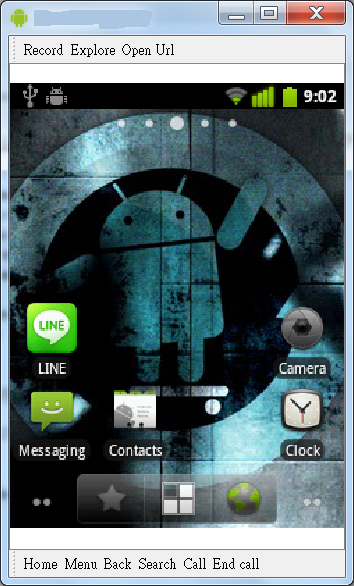
So I have a case of an android device (HTC tattoo, almost three years in running) with its touchscreen not functioning anymore. I was like OK, there's got to be a way for me to still use it with the hardware inputs/buttons. I wanted to connect to Wifi but I had no idea how I can possibly enter the password. Moreover, I wanted to register my Line application by email, so I can use Line on other devices, e.g. iPad. Again, malfunctioned touchscreen equates to no keyboard input.
The way around this is to remote control my android device via USB debugging, accompanied by the useful androidscreencast Java program. The steps are simple:
(1) Enable debugging by USB on your device
(2) Download the Android SDK and then the Android SDK Platform tools
(3) Download the androidscreencast application
(4) Connect the Android device to your computer via USB
(5) Run the androidscreencast application
Long and behold, you will see and feel your Android device in a new light!
This link How To: Pack a Suitcase is titled for busy moms. But I think it can very well suit most folks as well. I googled this topic on how to pack a luggage as I will soon travel and live in Australia. And today, I got heaps of stuff to pack with a maximum limit of 20 kg to bring!
Sometimes, after searching on ends for a possible and most elegant solution for a technical problem just doesn't come up with the goods. Then it is time to deploy your question on a domain/expert forum. In my case, I had a High Availability (HA) setup problem. I won't go into the specifics here. But it is just interesting that I find asking your own question on a forum like the SQL server forum can draw the attention of experts who will be able to offer their opinions most tailored to your problem!
Interop, the leading business technology event, is held at
different times of the year at locations including Las Vegas, New York, Tokyo,
and Mumbai. This year, I was very privileged to attend the one in Las Vegas,
where there were over 300 exhibitors in the expo and 100 conferences by topics.
Here, except for gambling, the areas covered in the conference are very wide
range: cloud computing, virtualization, security, mobility and data center
advances.
In the enterprise cloud summit, firstly, there is a fact
that cloud is becoming generally accepted as companies gain experience with the
concepts. According to CompTIA’s survey, 69% (vs. 42% last year) of individuals
rated themselves as familiar with the cloud. And 69% of companies are using
some form of SaaS application, whilst 36% of companies not using IaaS/PaaS
currently plan to do so in the future. So the reliance on cloud is every so
increasing. The sited reasons are lower costs, simpler/quicker implementation,
and expanded capabilities. There are challenges however, such as integration
with existing systems, vendor lock-in & selection, and changes to IT policy
and staff training. And there are hidden costs of the cloud as suggested by
company like Cloudability. If not under control (which can be hard), high costs
due to unused instances and over-provisioning are expected.
Other points of interests as mentioned in this cloud summit
are:
Openness in cloud platforms are starting to see
momentum as initiatives such as OpenStack gains success. The open cloud
ecosystem is now very rich. Rackspace, Cloud Stack, Cloud Foundry, Eucalyptus
and cloudscaling are just some to name a few. Diversity and cheaper
implementation are the two key reasons to adopt these open cloud systems. And
since the code is open, these systems should be secure and more trustworthy.
Generally, users tend to choose fun(ctionality)
over security. And this brings lots of headaches to the IT administrators. One
of the solutions at the virtualization level is that the Hypervisor will undergo
massive changes starting this year to become the root of security for clients
and clouds alike. Startups like Bromium looks toward a Byzantine Secure System
as a part of the change.
To be in the economic game these days, companies
are building and opening APIs for accessing their data services. The data
services can be monetized by APIs to sell to external vendors and partners. In
turn, the ecosystem of your business consolidates and grows at a higher level
of pace.
The increasing number of people bring their own
devices (BYOD) to work is an open security question left still largely
unaddressed at this point.
Interop has been mostly a business driven event. The number
of topics and products on display at the expo were staggering. And security
will continue to be the cornerstone and concern from both the vendor’s and
customer’s points of views. It will be very interesting to see how new security
problems and opportunities will be created in this every changing cloud era!
I was testing a piece of code to do with KMIP (Key Management Interoperability Protocol). The KMIP client code includes a C# wrapper that loads a C++ client library. However, I was stuck in a weird problem where I was getting the exception saying that this particular C++ KmipClient.dll is not found. But in fact, the file is located where the program expects it to be. So a chat with a fellow worker led me to check the DLL dependency for the DLL. I then went onto using the Dependency Walker tool. Below is the result of loading the KmipClient.dll.
The issue has been discovered! The root cause was the INGICAPI.DLL which is needed by KmipClient.dll was not loaded because it was not placed along with KmipClient.dll. So check your dependencies, folks :)
I was logging into my development VM machine when I found out that the administrator password that I set just a day before is invalid for some weird reason... (later, I think it's because of some password expiry policy that I cannot reuse this previous password again). This got me really frustrated since much of my code changes have yet to be submitted and are located on this machine. The impasse of not able to login to access your work code changes feels like someone has just finished writing a long section of thesis but forgot to press the "save" button then due to power failure, the section in work is no longer available.
Onto the road of recovery...
Thankfully, there's a solution to the password dilemma. I was able to reset my Windows Server 2003 administrator password by using cd080802.zip CD image as found in Windows Password Recovery. I simply mounted the bootable CD image as the first thing to run on system startup in VM. Then following the on-screen script instructions and using the default values mostly, the password reset was done. And life is back to normal again! Sweet~
I was visiting Hong Kong for a day because of the mandatory every-four-month-need-to-go-out-for-an-overseas-Taiwanese-guy-not-wanting-to-be-enlisted-into-the-military thing. This time, rather than just staying for a few hours at the airport then fly back to Taiwan on the next available flight, I decided to be more of a tourist.
Thanks to a travel guide book I bought at the airport bookshop in Taoyuan international airport, I got a sense of the place to visit and have meals, and the transportation allowing so. Once arrived in Hong Kong, the weather was a welcoming and balmy 23 degree Celsius. And I got the 100 HKD airport express ticket to/from Hong Kong station and the airport. (This is a special one-day round trip ticket). Since it was noon when I arrived, I went to this beef noodle place famous for it's fine beef stock and meat. [九記牛腩]
As you can tell from the photo, there was quite a line!
Next stop after the lunch was St Johns Cathedral. Visiting this place in solitude was quite relaxing! And the brief walk about helps digestion and soul cleansing at the same time :)
The Hong Kong park was inviting as a little getaway from the hectic and crowded city atmosphere.
The tramcars here offer easy accessibility to major stops on Hong Kong island. It's an unique hop onto the 2nd floor of a train experience if you've never had before.
For afternoon tea, I had some famous con-gees with pork and 皮蛋.
Further still, I had some whole milk pudding that comes with a flaky thin films on the surface. The combined texture was amazing and satisfying to taste.
A little stop at the western market to see the its antique architecture was a good way to round off the day's visit.